In order for team members to function effectively, responsibilities and expectations should be clear. Processes help make expectations clear, but also allow for optimisation over time, as by following consistent processes, you can measure and compare performance metrics, before and after changes were implemented (which is not possible if processes are not clearly defined).
Self-Organising Teams
When we think about automated processes, we usually think about programmatically automated processes (eg. you schedule an email to be sent, and at the scheduled time, some background process starts and the email is sent without any further action on your part). In a system consisting of technical resources this approach is possible, but in a system made up of human resources, this type of automation is unfortunately not possible. Automation in a team of human resources is achieved when every node in the system knows how to act in any situation (ie. every member of the team knows how to move the process forward in any situation).
While this may sound impossible, in practice it is actually works for most use-cases, given that that every team member:
-
Knows their domain and responsibilities
- So they understand what is expected of them and can make meaningful decisions
-
Knows their decision making scope
- So they know what decisions they can make autonomously, without wasting time involving others (eg. other teams or a manager) unnecessarily, and which they cannot.
-
Knows the scope and responsibilities of their counterparts
- So they know when to involve other teams, and who to redirect requests to, should they be out of their own teams scope.
Consider the example below of a support request coming into one of your engineers (either via DM, or a support ticket etc); generally speaking the engineer should either “fix” or “reassign”, but they can only do this if they understand their domain/ responsibilities well enough to identify if it is within their scope or not, and only in the edge-case that they cannot identify which scope the request falls in, the manager is involved to clarify expectations. While the process in the example is heavily simplified for the purposes of the example, the intention is to demonstrate how a process can be considered automated in a system made of human resources.
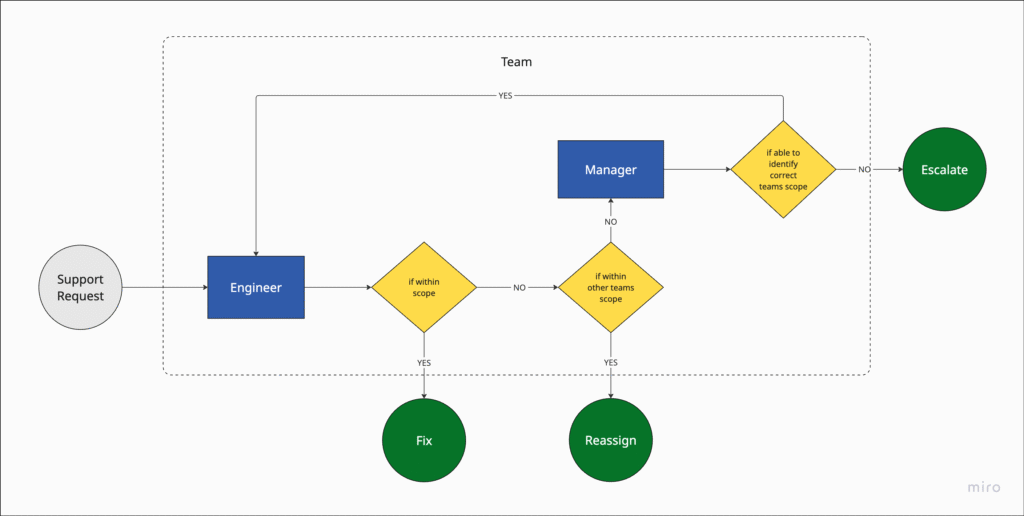
A good way to test if the team is self-organizing and your processes are automated, is to see if every engineer in the team can man the support channel without needing to constantly involve a manager; if so, it’s a good sign that the team is starting to self-organise.
So, in essence, a self-organising team is a system of human resources, connected by clearly defined processes. Some of the common processes that I have found effective are:
- Support Management
- Incident Management
- Definition Artifacts
An efficient support process in a tech company is structured, scalable, and tightly integrated with product, engineering, and customer success teams. It is customer-focused, data-informed, and automation-enabled, with seamless collaboration across teams. It’s not just about solving problems — it’s about creating value, loyalty, and insight, and ensures rapid issue resolution, consistent communication, and actionable feedback loops.
Support Management
I’ll start by describing the general components involved in a support process at a product company:
Structural Requirements
Choose your model and tools, as they will determine the underlying processes.
Tiered Support Model
Organize support into levels to handle complexity efficiently:
-
Tier 0: Self-Service
Knowledge base, FAQs, forums, product documentation and/ or chatbots. -
Tier 1: General Support (optional)
Support staff who triage, resolve common issues, and gather necessary information. -
Tier 2: Technical Specialists (optional)
QA teams who handle more complex technical issues or bugs. -
Tier 3: Engineering Escalation
Critical issues requiring code changes, deep diagnostics, or infrastructure-level insights.
Tier 1 & 2, in the example above, are optional tiers, in that it will depend on the size and type of company, as to whether it requires dedicated QA and/ or support teams. In a small B2B company collaborating with other small tech companies, you might choose to simply have a support channel where engineering teams from both companies can open support requests for each other, and all support requests are escalated to engineering (Tier 3), and handled by the team that owns that domain (so in this case, only Tiers 1 & 3 are required).
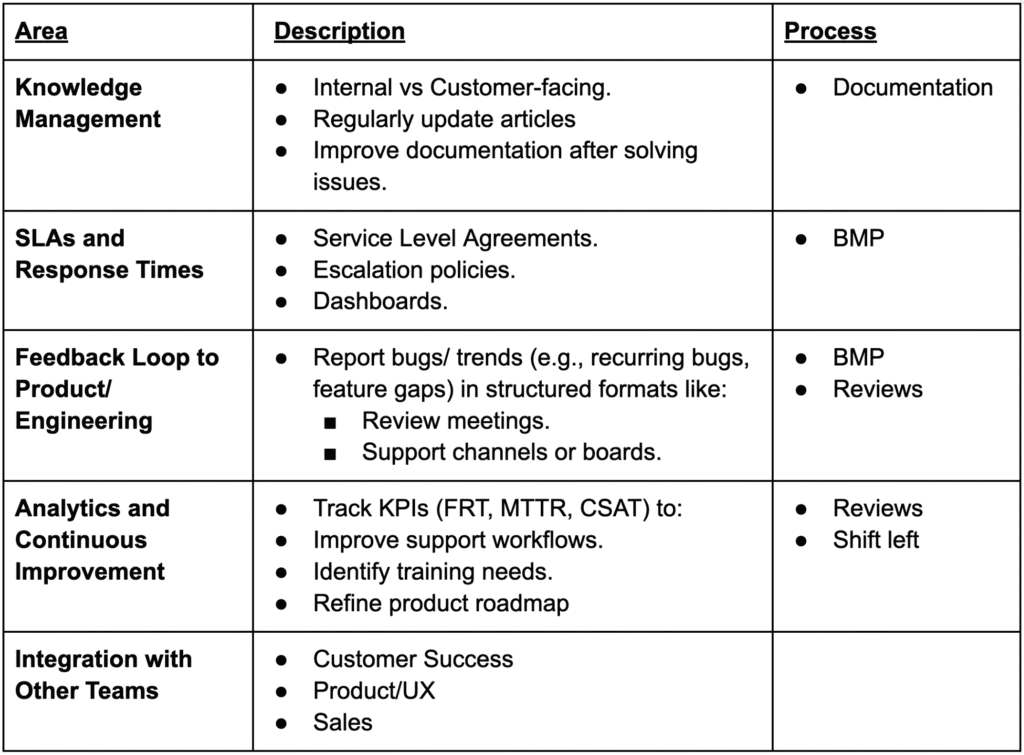
Centralized Ticketing Tool
Use tools like Zendesk, Freshdesk, Intercom, or Jira to:
- Track incoming support requests from multiple channels.
- Assign, escalate, and prioritize tickets using SLAs.
- Tag and categorize tickets for analytics and reporting.
Ways of Working
Support Requests
Definition: A support request generally refers to an issue raised by an individual user that may not stem from a defect in the software but still needs attention to address a specific user concern.
Scope: Typically impacts one user or a limited subset of users, often due to factors like configuration errors or access permissions rather than system faults.
Resolution: Commonly addressed through manual interventions – such as updating user settings, modifying account details, or offering guidance or training – without requiring changes to the software itself.
Handling: Managed independently of the formal Bug Management Process, usually by customer support or a service team.
Bugs
Definition: A bug refers to a defect or malfunction in the software that leads to incorrect behavior, unexpected results, or deviations from the intended functionality.
Scope: Generally impacts one or more components or features of the application or system.
Resolution: Involves modifications to the codebase, system design, or database to address and correct the root cause.
Tracking: Handled within a formal Bug Management Process (BMP), which is used to document, monitor, and prioritize bug fixes.
Bug Management Process (BPM)
If an organization is struggling with inconsistent bug reporting, unclear ownership, undefined prioritization standards, or limited visibility into bug status and trends (or simply wants to avoid all of the above), it may be time to implement a clearly defined Bug Management Process.
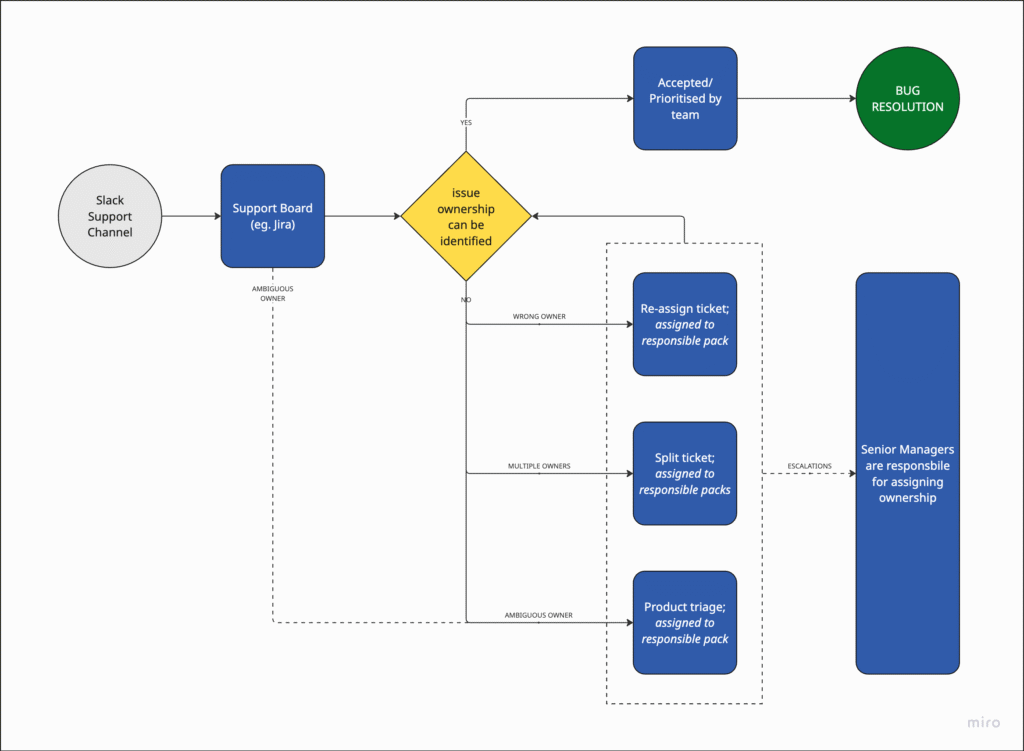
The goal is to establish a clear, consistent, and transparent approach to handling bugs across the organization, regardless of their origin (e.g. Customer Support, Sales, QA etc), by aligning on definitions, responsibilities, and workflows.
A structured approach helps ensure that bugs are reported through a unified channel with the right information, assigned to the appropriate teams efficiently, resolved based on agreed-upon priorities and SLAs, and tracked transparently across the organization.
Objectives:
- Standardize Bug Intake: Create a unified submission channel for all bugs, and ensure required information is captured to enable effective triage and prioritization.
- Improve Visibility and Transparency: Increase visibility into the bug lifecycle for Engineering, Product, and Leadership teams, supporting informed decision-making through regular reporting.
- Clarify Roles and Responsibilities: Define ownership for triaging, assigning, and resolving bugs, ensuring accountability across cross-functional teams.
- Align on Bug Definition: Establish a shared understanding of what qualifies as a bug to reduce ambiguity during intake and triage.
Return on Investment:
- Bug Intake: A single, streamlined process for submitting bugs with all necessary context for evaluation.
- Bug Triaging: A consistent triaging workflow that ensures timely assignment to the correct team, minimizing internal hand-offs.
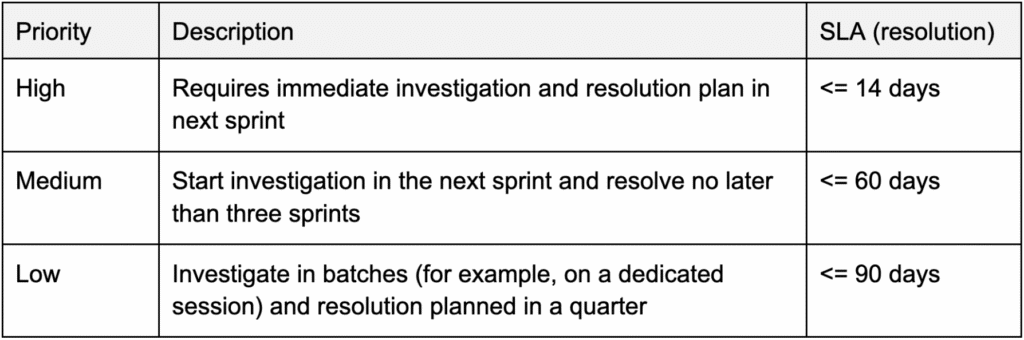
- Bug Resolution: Clear guidelines for prioritizing and resolving bugs, including defined SLAs and impact-based criteria.
- Reporting & Transparency: Regular updates and dashboards that communicate bug volume, severity, resolution progress, and trends to leadership.
> Example BMP:
> Example SLAs:
Incident Management (IMP)
An incident is an operational event or issue that requires a timely response because the platform is either unavailable or experiencing performance degradation, affecting key functionalities for a significant number of customers or end users. Incidents require immediate intervention and troubleshooting to restore service.
A typical Incident Management Process would involve the following phases:
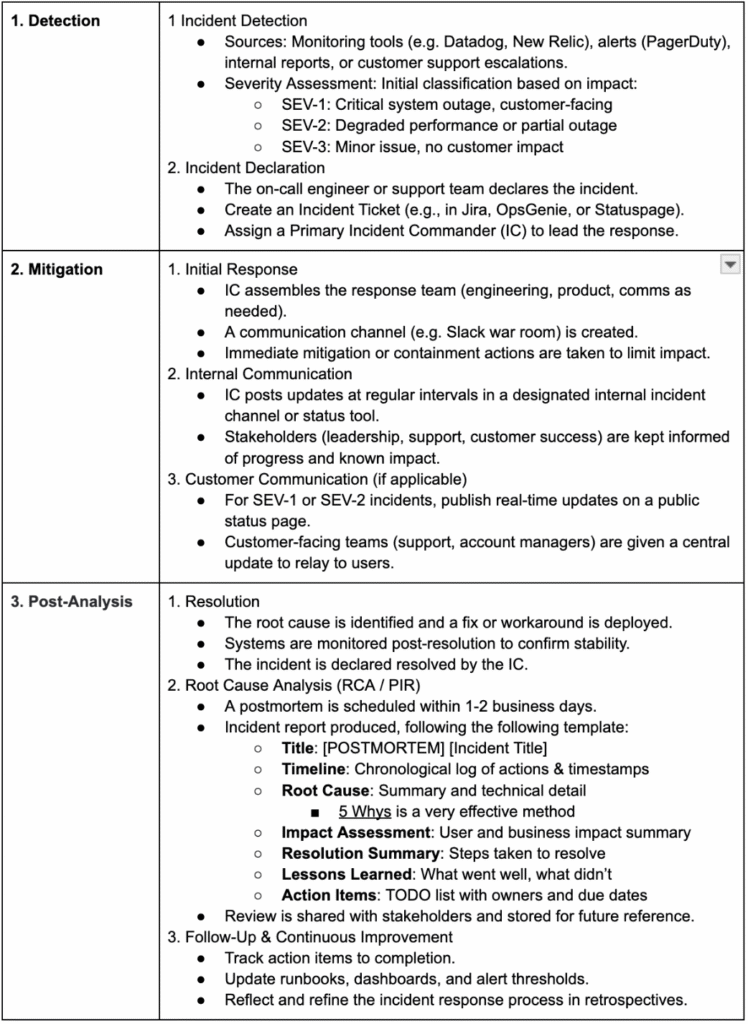
A useful tool for the Root-Cause Analysis is the 5 Whys method, I recommend digging deeper into this approach (I have found it useful for root cause analyses outside of incident mitigation too; for example, understanding why a certain process isnt working well).
> Example Postmortem Template (from Atlassian)
Commonly Used Products
- Alerting: PagerDuty, OpsGenie, Prometheus
- Monitoring: Datadog, New Relic, Grafana
- Comms: Slack (with dedicated incident channels), Statuspage
- Documentation: Confluence, Notion, or GitHub for postmortems
- Ticketing: Jira, Linear
Definition Artifacts
While defining a clear definition of ready or done isn’t a process, enforcing it is. Having clear Definition of Ready (DoR) and Definition of Done (DoD) is critical in tech product teams to ensure alignment, reduce ambiguity, and ship high-quality software consistently.
Definition of Ready (DoR)
The Definition of Ready outlines the criteria a user story or task must meet before it can be picked up by the development team.
Why It Matters:
- Prevents unplanned work mid-sprint.
- Ensures developers have what they need to start without guessing.
- Reduces back-and-forth and rework.
- Makes sprint planning more predictable.
Example DoR:
- Clearly written user story with acceptance criteria
- Business value or user goal is defined
- Dependencies are identified and resolved
- Technical approach (if non-trivial) is agreed upon
- UI/UX designs are finalized and available (if needed)
- API contracts or integration points are defined
- Stakeholders have reviewed and signed off (if required)
- The story is estimated by the team
- No open blockers (e.g. access, permissions, approvals)
- The story is prioritized for an upcoming sprint
Definition of Done (DoD)
The Definition of Done defines the criteria that must be met for a user story, bug fix, or feature to be considered complete and potentially shippable.
Why It Matters:
- Sets a consistent quality bar.
- Avoids hidden “almost done” work (e.g., “code is done but not tested”).
- Ensures work is shippable, not just “coded.”
- Builds trust between engineering, product, and stakeholders.
Example DoD:
- All acceptance criteria are met
- Code is written and peer-reviewed
- All tests pass (unit, integration, E2E as applicable)
- No critical or high-severity bugs are open
- Code is merged to the main branch
- Code builds and deploys successfully
- Feature is tested in a staging or QA environment
- Relevant documentation is updated (code, README, user docs)
- Feature flag is added (if needed)
- Release notes are drafted (if external-facing)
- Demo or sign-off is completed (if complex or cross-functional)
Why Both Are Important:
| Without DoR | Without DoD |
| Sprint starts with unclear or incomplete work. | Work is “done” but isn’t ready for production. |
| Time spent unblocking stories mid-sprint. | Bugs, rework, and customer issues increase. |
| Misalignment between Product and Tech. | Miscommunication about what “done” means. |
Best Practices
- Keep DoR and DoD visible in your sprint board or team docs.
- Review and refine them periodically—especially after retros.
- Apply them across stories, bugs, tech debt, and spikes where applicable.
- Use them as checklists during planning and reviews.
What next?
Defining these processes is a good base from which to start, but don’t stop there; as you face new issues that start to recur, try to review the process, and what can potentially be automated.
Review/ Check-in
Feedback Loops | Individuals
A feedback loop is a continuous process where information about performance or behavior is shared, reflected on, and used to make adjustments or improvements. It’s called a “loop” because it’s not a one-time event; it involves ongoing communication and iteration. Without a feedback loop, people operate in the dark; they don’t know what’s working, what isn’t, or how they’re perceived. A strong feedback loop creates alignment, improves results, and fosters a culture of continuous learning. I have also found that it keeps me, as a manager, informed about the individual’s contributions and accomplishments.
Sprint Review | Team
A sprint review is a key event in Agile frameworks like Scrum, held at the end of a sprint (usually every 2 weeks, but this is flexible). Its primary purpose is to inspect the work completed during the sprint and adapt the product backlog if needed. It’s a collaborative session involving the development team, product owner, and stakeholders. A sprint review will usually involve a demonstration of completed work, gathering feedback, backlog adjustment, and a goal/ progress discussion. The goal is not simply to demo to stakeholders; it’s a critical feedback and planning checkpoint that ensures the team is building the right thing and allows the product to evolve with real-world input. It’s essential for maintaining agility, alignment, and accountability in product development.
Monthly Review | Leadership
A monthly review can be a valuable addition to the review process for larger organisations that have a senior leadership layer that cannot attend every team’s sprint reviews, but want to have a review process. The intended audience is managers and senior leadership, and it involves:
- A review of the unit’s performance metrics (e.g. DORA, incidents, bugs, velocity, lead/cycle time etc), where teams are invited to provide justifications for anomalies in their team’s metrics.
- A high level goal progress report from each team; presenting OKR progress, achievements and blockers.
Shift-Left
Testing
Shift Left Testing is a software development approach that emphasizes testing earlier in the development lifecycle; “shifting left” on the project timeline. The key idea is that instead of waiting until the end (after development) to test, testing activities begin during or even before development; often starting at the requirements or design phase.
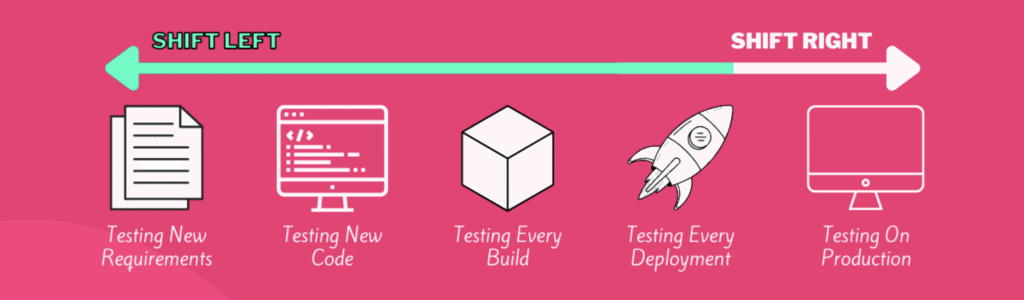
The goal in shift-left testing is to:
- Find defects early (cheaper and easier to fix)
- Reduce costly late-stage bugs
- Improve quality and reliability
- Enable faster, more efficient releases.
Common approaches include:
- Writing unit tests and integration tests early
- Using automated testing pipelines
- Involving testers in requirement and design discussions
- Test-driven development (TDD) etc.
In summary, Shift Left Testing means building quality into the product from the start by integrating testing early and often; leading to faster feedback, better products, and lower costs.
Everywhere
The shift-left methodology can be effectively applied beyond testing. The core principle of “move critical processes earlier in the cycle” can significantly enhance the speed, quality, and outcome of other areas in the development funnel.
For example, we can “shift-left” all the way to the hiring and talent acquisition process, applying the same methodology:
- Early Involvement of Stakeholders
- Shift-Left: Involve hiring managers, team leads, and even peers at the job scoping stage; not just during interviews.
- Benefit: Creates clearer, aligned role definitions and better screening criteria.
- Proactive Talent Sourcing
- Shift-Left: Start identifying and nurturing potential candidates before a role is formally open.
- Benefit: Reduces time-to-fill and ensures access to high-quality talent.
- Define Requirements Early and Accurately
- Shift-Left: Clarify must-have skills, culture fit indicators, and performance expectations at the outset.
- Benefit: Prevents wasted time screening the wrong candidates and reduces mismatches.
- Early Assessment Design
- Shift-Left: Integrate skills assessments, case studies, or job previews at the initial application or pre-interview stage.
- Benefit: Filters in high-quality candidates earlier, saving time for both recruiters and hiring teams.
- Onboarding Planning During Hiring
- Shift-Left: Begin designing onboarding and growth plans while hiring is still in process.
- Benefit: Speeds up ramp-up time and aligns expectations from day one.
This approach reduces hiring delays, improves candidate experience, boosts quality-of-hire, minimizes costly mis-hires, and aligns hiring with business needs earlier. So, just like in software, shifting left in hiring helps you: prevent problems instead of reacting to them, build quality in from the beginning, and speed up time-to-value.
So hopefully this demonstrates how the approach can be applied to different areas of the development process; the main goal is to always be considering how you can proactively catch issues as early in the funnel as possible, avoiding issues arising later in the development process, where they can be much harder to resolve.
Agile Documentation
Traditional documentation, that needs to be maintained and updated after each change to the service, is a tax on agility, due to the overhead of having to keep the documents up-to-date. For this reason, more agile forms of documentation have emerged, focussing on documenting only what needs to be documented. These documents are timeboxed and have a finite end date, therefore they do not require constant maintenance.
While there is still product documentation (which i wont cover, as this is usually not maintained by the engineering teams), as well as support documentation (ie. How-Tos/ Runbooks) that need to be maintained, I have found that when it comes to design related engineering documentation, there are a set of agile documents that cover most use-cases that a product development team will encounter in the development process:
RFC | How do we solve a certain type of problem?
- When? We have a problem to solve and cannot align on a solution.
- Why? We want to collect feedback from a wider audience.
- Eg. Introducing Feature Flags into the Core Application
- Timebox: ~2 weeks
A good RFC (Request for Comments) candidate is any significant proposal that requires collaboration, visibility, or feedback before being implemented; especially when it may impact multiple people, teams, or systems.
Design Doc | How will we design the system?
- When? We are going to create or modify a system.
- Why? We want to visualise and share the proposed solution.
- Eg. Adding Offline Mode to a Mobile App
- Timebox: duration of project’s discovery phase
A good Design Doc (design document) clearly communicates what you’re building, why you’re building it, and how; so that teammates, stakeholders, and future maintainers can understand and critique your solution before (and after) implementation.
Spike | How can we better understand this problem space?
- When? We have an area we do not understand.
- Why? We want to reduce uncertainty, explore options, or gain knowledge.
- Eg. Evaluate Payment Gateway Integrations (Stripe vs. Braintree)
- Timebox: 1-3 days
A good Spike is a time-boxed research task designed to reduce uncertainty or answer a specific question before development begins. It produces learning; not a finished feature.
When to use what?
I have found the following to be a useful and simple process for selecting which documents to produce in the discovery phase:
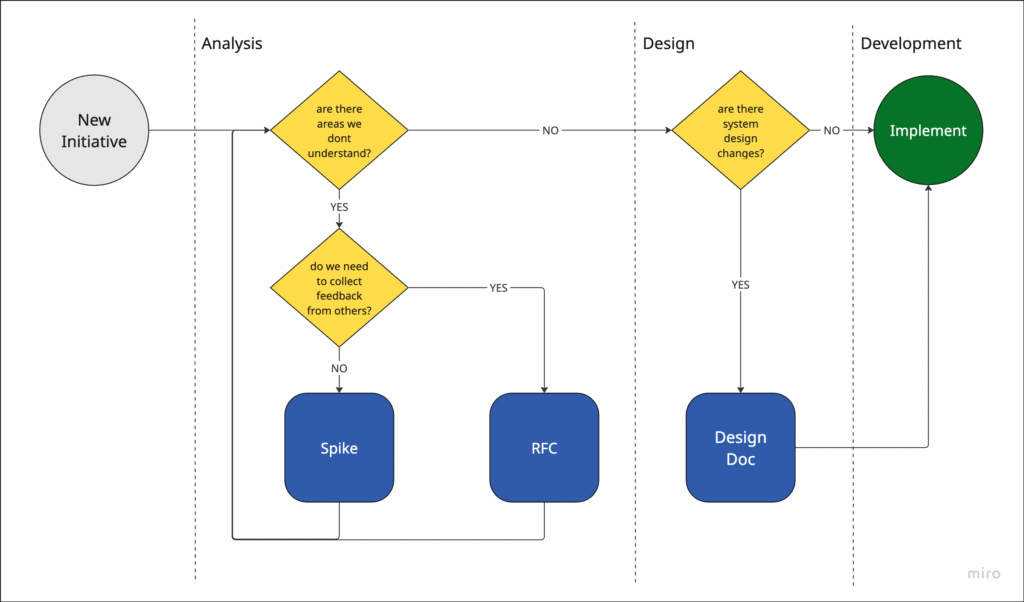
Footnotes
- What is shift-left testing? (SoftwareTestingMaterial) ↩︎